Paragraph Typing Test: How to Take One and Read Your Score
By A. Pepper, CEO of Type Click Tests ·
A paragraph typing test asks you to copy a block of connected sentences against a timer, then reports your speed in words per minute (WPM) and how accurate you were. It is the closest a test gets to real typing: capital letters, commas, and full stops all count. The best way to use one is to pick a length that matches your goal, read the result as speed and accuracy together, and repeat it on a schedule. You can start on our free typing tests, which run from 15 seconds to 5 minutes, need no signup, and show the clock and the ranking rules the whole time.
TL;DR
- A paragraph test measures sustained typing of real sentences, so it predicts everyday typing better than a list of random words.
- Your score is speed and accuracy together. A fast run full of errors is a weak result.
- Use 1 minute for a standard check, 3 to 5 minutes for endurance, and 15 to 30 seconds for a quick warm-up reading.
- Take the same test at the same length once a week and compare like with like.
- Type Click Tests gives you WPM, CPM, accuracy, and an animal rank from Snail to Falcon, free and with no account.
Table of Contents
- What a paragraph typing test actually measures
- How the score is calculated, and why errors cost you
- What counts as a good score
- Why your score changes from test to test
- Choosing a passage and test length
- How to take a paragraph test properly
- How to practice with paragraphs and actually improve
- Typing tests and click tests are different skills
- Take your paragraph test here
- Common mistakes that hold scores down
- FAQ
- Sources
What a paragraph typing test actually measures
A paragraph test shows you a passage, usually a few sentences long, and starts the clock when you press the first key. When time runs out, the page compares what you typed with the passage and calculates your result. Online versions do this in the browser, so you get the score instantly.
Three numbers matter:
- WPM (words per minute): how much text you produced per minute. Most tests treat five characters, spaces included, as one word, so a long word does not count more than a short one.
- CPM (characters per minute): the same speed expressed in raw characters. It is the more granular figure, and it is what our ranking uses.
- Accuracy: the share of characters you typed correctly.
The reason to use paragraphs rather than single words is rhythm. Real text makes you move between letters in uneven patterns, reach for the shift key, and handle punctuation. A short test of easy common words can flatter you. A passage with commas, quotation marks, and a few longer words shows what your hands really do.
How the score is calculated, and why errors cost you
The simplest version is gross speed: characters typed, divided by five, divided by minutes. If you type 300 characters in one minute, that is 60 WPM. Gross speed ignores mistakes, though, which is why serious assessments adjust for accuracy.
Research uses the same idea. A 2026 study of U.S. adults computed an adjusted typing speed as speed multiplied by accuracy, chosen as the main measure because it takes both speed and accuracy into account. So the 60 WPM typist who got 90% of characters right scores about 54 on that adjusted measure, while a 55 WPM typist at 99% scores about 54.5. The slower, cleaner typist matches or beats the faster one.
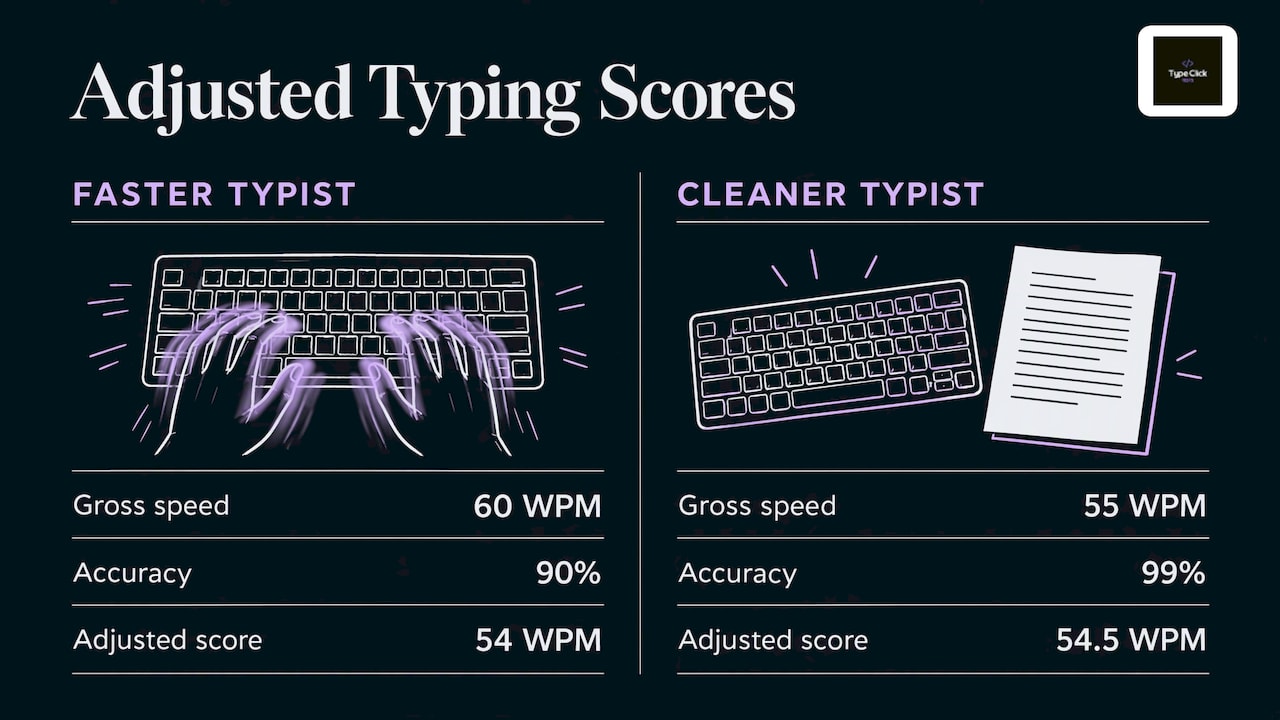
That is the logic behind how we build feedback: accuracy gets equal weight to speed in our results and tips. If you want the full argument, our guide on why typing accuracy matters more than a headline WPM walks through it with examples.
A worked example
Say you take a one-minute test and type 340 characters, of which 17 are wrong.
- Gross speed: 340 / 5 = 68 WPM.
- Accuracy: 323 correct out of 340 = 95%.
- Adjusted speed: 68 x 0.95 = about 64.6 WPM.
Now imagine you slow slightly and type 320 characters with 3 errors. Gross speed is 64 WPM, accuracy is about 99%, and the adjusted result is about 63.4. You are almost level, with far fewer corrections to make in a real document. Cleaner typing is also less tiring, which matters in longer tests.
What counts as a good score
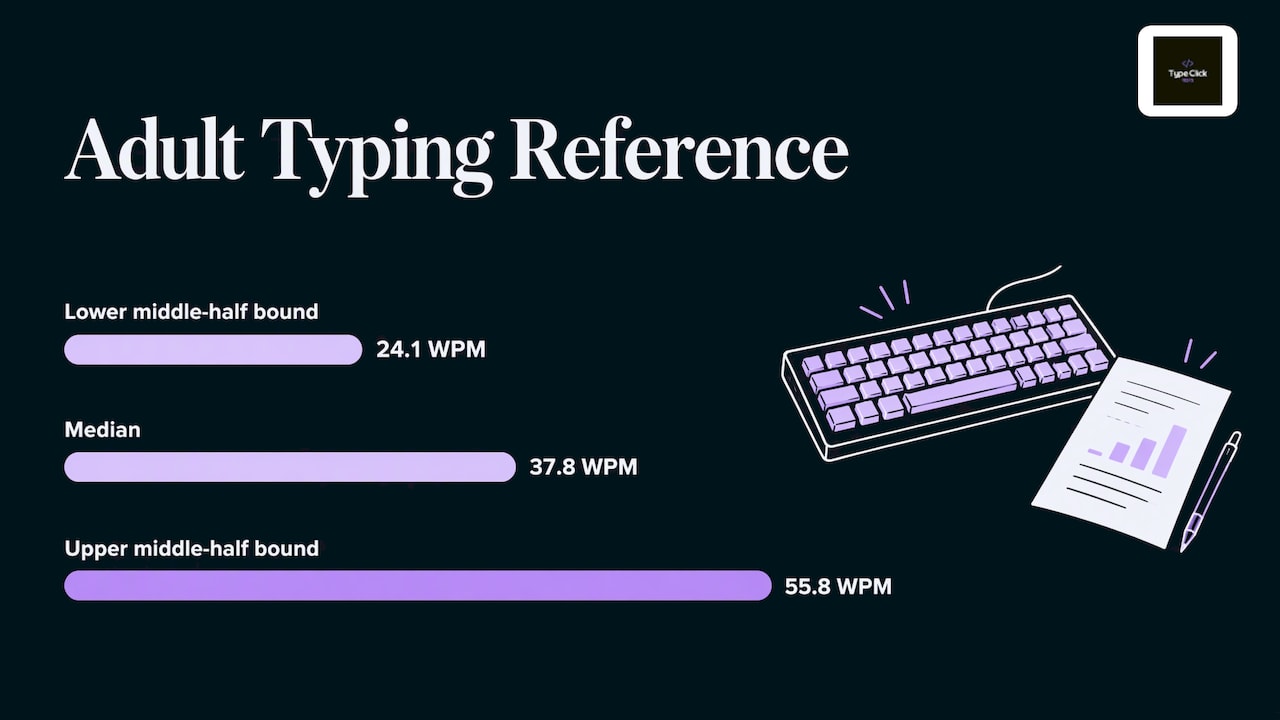
Scores only mean something against a reference. In a 2026 Scientific Reports analysis of 10,613 U.S. adults, computer users had a median accuracy-adjusted speed of 37.8 WPM, and the middle half of them fell between 24.1 and 55.8 WPM. That is lower than many people expect, because everyday typists are not practiced test-takers.
A rough way to read your own result:
| Adjusted WPM | How to read it |
|---|---|
| Under 25 | Still building the basics, typically looking at the keys |
| 25 to 40 | Around the middle of the adult range |
| 40 to 55 | Comfortable for most office and study work |
| 55 to 75 | Fast, usually with touch typing habits |
| 75 and above | Very fast; accuracy is now the main thing to protect |
For work, requirements vary by employer. A commonly cited example is that the U.S. Office of Personnel Management asks for 40 WPM on a five-minute test with three or fewer errors for clerk-typist and office automation roles, which works out to better than 99% accuracy. If you are preparing for a job assessment, our page on what WPM you need for a job helps you set a target, and the average typing speed bands show where you sit.
Why your score changes from test to test
You will rarely get the same number twice, and that is normal. The main reasons:
- The passage. Text full of long words, numbers, or unusual punctuation slows nearly everyone. A passage of plain sentences is easier.
- The length. A 15 second burst rewards sprinting. A 5 minute test exposes fatigue and drifting accuracy.
- How errors are handled. Some tests let you backspace and fix mistakes, which costs time. Others lock the error in and count it against accuracy.
- Your keyboard and posture. A laptop keyboard and a full-size one feel different, and a phone is slower again. In the same U.S. study, smartphone users had a median of 29.4 WPM.
- Warm-up and attention. Your first run of the day is usually your weakest.
Because of all this, compare scores only when the passage type, duration, and device match. Comparing a 30 second sprint with a 5 minute run tells you very little.
Choosing a passage and test length
Pick the duration by the question you are asking.
| Goal | Best length | What it shows |
|---|---|---|
| Quick baseline or warm-up | 15 seconds | Burst speed and first-key reaction |
| Fast check on your level | 30 seconds | Speed with a small accuracy sample |
| Standard WPM benchmark | 1 minute | The figure most people quote |
| Endurance and job preparation | 3 minutes, up to 5 | Stamina, consistency, accuracy under fatigue |
As for the passage, choose text that matches what you will really type. Students writing essays should practice with plain prose that includes commas, apostrophes, and the occasional quotation. Someone preparing for a data-entry role should also try digits, which is a different skill; our number typing test guide covers it. Avoid passages so easy that every word is short, and avoid ones so dense that you spend the whole test deciphering the words rather than typing them.
A good rule: if you must stop to read the next phrase, the passage is too hard to measure typing. If you can finish with no pauses and no thought, it may be too easy to teach you anything.
How to take a paragraph test properly
- Set up first. Sit with your forearms level and your screen at eye height. Close extra tabs so the page does not lag.
- Read the first line before you start. Reading slightly ahead of your fingers is the habit of fast typists.
- Type at a steady pace. Do not sprint at the start and collapse at the end. An even rhythm gives a more honest score.
- Do not chase the clock when you slip. One wrong key followed by panic usually causes three more. Keep going and aim for the next word.
- Look at accuracy before speed. If accuracy is below roughly 95%, slow down on your next run until it recovers.
- Record the result. Note the WPM, accuracy, passage length, and test duration.
Our tests keep the timer and the scoring criteria visible, so you always know what is being counted. Results appear as soon as the clock ends, and you can try again straight away.
How to practice with paragraphs and actually improve
Speed grows from clean repetition, not from a single heroic run. A workable routine:
- Start with accuracy. Type at a pace where you make almost no errors. Speed follows once the movements are automatic.
- Use touch typing. Keeping your eyes on the screen and each finger on its own keys is what separates typists who plateau from those who keep climbing. Our article on touch typing versus hunt-and-peck explains what really changes your WPM.
- Mix durations. Use 30 seconds for sharp bursts, then a 3 minute run to practice holding form.
- Review your errors. If the same letters keep going wrong, say the top-row keys or the pinky reaches, slow those down on purpose.
- Keep sessions short. Ten to fifteen focused minutes a day is easier to maintain than an occasional hour.
How often to test
Test less often than you practice. In a high school keyboarding study, students took a two-minute timed paragraph test once a week, with speed and actual error counts recorded. That cadence is a sensible model: one scheduled test per week, same length, same time of day, written down. Everything else is practice. Testing every few minutes only measures your fatigue.
Typing tests and click tests are different skills
Gamers often arrive here wanting a speed number, so a quick distinction helps. A typing test measures how fast and accurately you reproduce text. A clicks-per-minute test simply counts mouse presses inside a fixed interval and scales the rate to 60 seconds. They train different muscles and carry different meaning: one is relevant to work and study, the other to aiming and reaction games.
If you want both, we have a 5 second click test and a 30 second click test, plus reaction games like the F1 Reaction Test and Stop the Wheel. They make a fun break between typing runs.
Take your paragraph test here
Type Click Tests lets you measure WPM, CPM, and accuracy in the browser with no account and no paywall. Pick a duration from 15 seconds to 5 minutes, type, and see your result with an animal rank from Snail up to Falcon. The clock and the ranking criteria are visible throughout, and the tips that follow treat accuracy as seriously as speed.
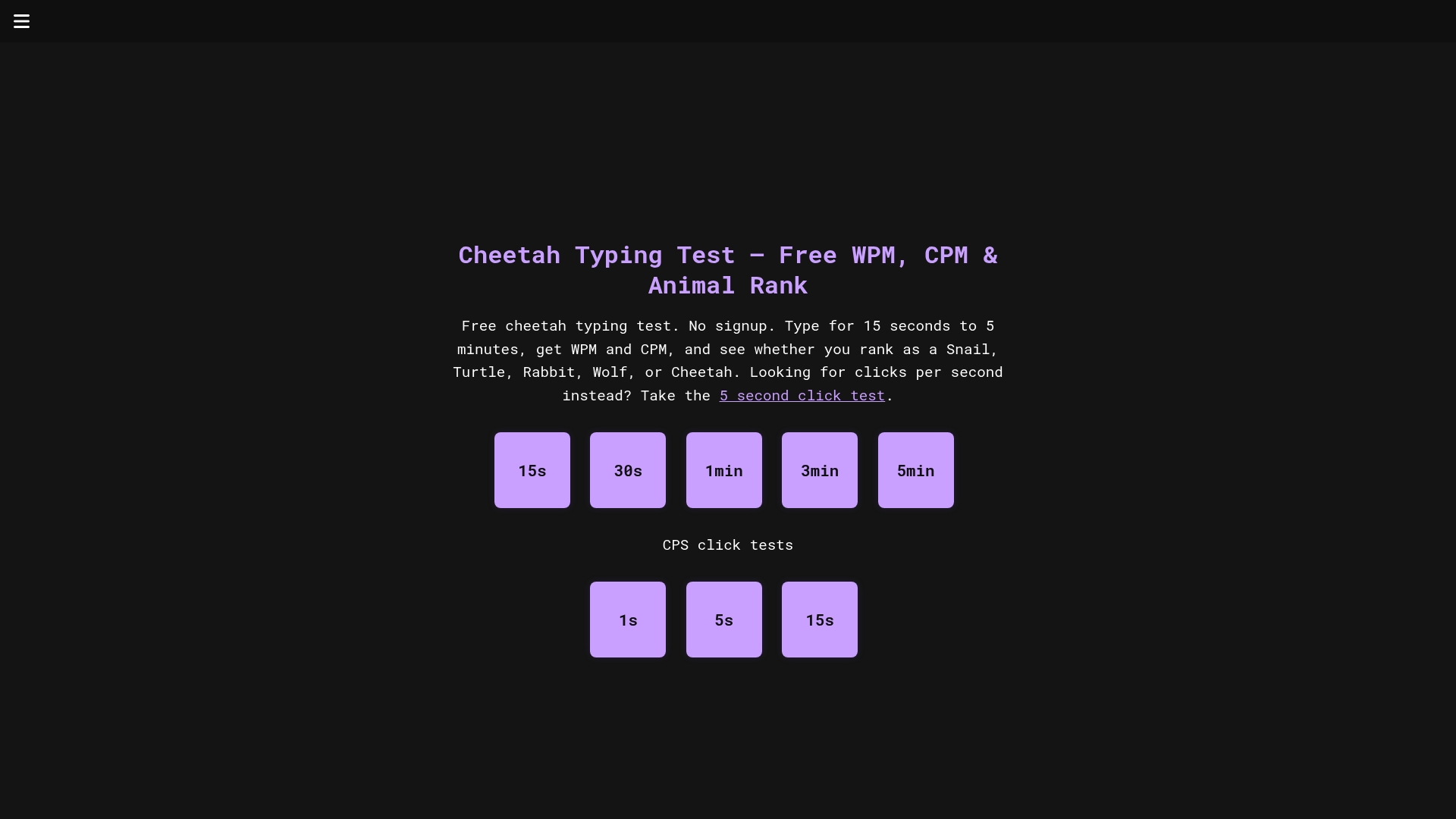
For a standard benchmark, start with the 1 minute typing test. Once you have a baseline, move up to the 3 minute endurance check, or browse everything on the Cheetah Typing Test home page, including quizzes such as Higher or Lower: Countries and the Color Memory game for a break between rounds.
Common mistakes that hold scores down
- Looking at the keyboard. It breaks your reading flow and caps your speed.
- Correcting every typo instantly. In a timed test, a backspace costs more than it seems. Learn to notice errors without panic.
- Comparing across tests. A 30 second score is not a 5 minute score.
- Ignoring accuracy. A headline WPM with many errors is not a strong result.
- Practicing only when rested. Test once when you are tired too, since real work is rarely done fresh.
FAQ
What is a paragraph typing test?
It is a timed test in which you copy a passage of connected sentences as quickly and accurately as you can. The result is reported as WPM and accuracy. Because it includes punctuation and normal sentence flow, it reflects everyday typing better than random word lists.
How long should a paragraph typing speed test be?
One minute is the standard for a benchmark you can compare over time. Use 15 to 30 seconds for a quick check, and 3 to 5 minutes when you want to test endurance or prepare for a job assessment. Keep the length the same when comparing results.
Does accuracy affect my WPM?
Yes. Many assessments adjust speed by accuracy, as in a 2026 U.S. study that multiplied the two. A slightly slower run with very few errors can match or beat a faster, messier one.
How often should I take the test?
Once a week is enough to see a trend, using the same duration each time. Practice more often in short sessions, and treat the weekly test as your measurement.
Do I need to sign up to use an online paragraph typing test?
Not on Type Click Tests. All the typing tests and games are free and open straight away, with no account required.
Sources
- Functional and cognitive correlates of typing speed in a U.S. panel study (PMC, 2026)
- Average Typing Speed in 2026: WPM by Device & Age
- A Study of Typing Speed and Accuracy Development (Old Dominion University)
- Clicks Per Minute Test