How to Click Faster: Techniques, Practice Plan and Safe Limits
By A. Pepper, CEO of Type Click Tests ·
To click faster, fix your setup first, then learn one technique at a time (normal, jitter or butterfly), and measure each change on the same timed test. Raw effort does not get you there. A relaxed hand, a steady rhythm and a clean way to track your score do. You can run that loop on our 5 Second Click Test, which is free, needs no signup and shows your clicks per second (CPS) the moment the clock ends.
TL;DR
- CPS is the number of clicks divided by the seconds on the clock. Always compare scores from tests of the same length.
- Set up first: forearm supported, fingers resting on the button, mouse close to your body, light grip.
- Learn one technique at a time. Jitter clicking and butterfly clicking are the common fast ones. Your fastest burst is not your realistic score.
- Practice in short sessions, log your best and average score per test length, and stop when your hand aches.
- Mouse specs such as polling rate do not replace technique. Comfort and rhythm decide most of your score.
Table of Contents
- What CPS measures and why test length matters
- Step 1: Fix your setup before you try tricks
- Step 2: Learn one clicking technique at a time
- Step 3: Build a practice routine that actually improves CPS
- Step 4: Track your CPS so you know it is working
- Can you click 20 CPS, or 100 CPS?
- Protect your hand while you push speed
- Where typing practice fits in
- Practice with the tests built for it
- FAQ
- Sources
What CPS measures and why test length matters
CPS stands for clicks per second. You click as many times as you can before a timer ends, and the score is total clicks divided by total seconds. Ten clicks in a 5-second test is 2 CPS. Seventy-five clicks in 5 seconds is 15 CPS.
The length of the test changes what the number means:
- 1 second: a pure burst. Nearly everything depends on how fast you can start. Our 1 Second CPS Test shows your peak.
- 5 seconds: the common benchmark. Long enough to settle into a rhythm, short enough that you do not tire.
- 30 seconds: a test of control. Our 30 Second Click Test shows whether your burst technique survives once the first rush fades.
- 60 seconds: a click marathon. Fatigue becomes the main limit. We explain the difference in how the 1 minute click test differs from 1s CPS.
A score of 9 CPS on a 1-second test and 9 CPS on a 60-second test are very different achievements. If you want to know where your number sits, see what a good CPS is by test length.
Step 1: Fix your setup before you try tricks
Most people who stall at a low score are fighting their own posture. Spend five minutes on this before you learn anything fancy.
Support your arm and keep your wrist straight
Rest your forearm on the desk so your shoulder is not holding the weight of your arm. Keep your wrist in a straight line with your forearm. The U.S. Occupational Safety and Health Administration (OSHA) advises doing hand tasks with the wrist in a straight, neutral posture, and placing the keyboard and mouse close together at about the same height to reduce reaching. A bent wrist is slower and it is also where repetitive strain starts.
Rest your fingers on the button
Lifting your finger high between clicks wastes time. The fastest clicks use the smallest movement: your fingertip stays in contact with, or just above, the button, and only the press and release move. Arch your fingers slightly so the tips do the work instead of the whole finger pad.
Loosen your grip
A tight grip tenses your forearm, and a tense forearm cannot repeat fast small movements. Hold the mouse just firmly enough to keep it from sliding. OSHA also notes that finger and forearm muscles can get sore when a pointing device is set so sensitive that it is hard to control, so a sensible pointer setting helps comfort too.
Pick a mouse that is comfortable first
A 2022 gaming guide from Shacknews lists comfort among the factors for a mouse you want to click fast with, and warns that speed should not cost you fatigue. A mouse that fits your hand lets you hold your technique longer. Mouse and trackpad scores also differ for the same person, which we cover in mouse vs trackpad CPS. Pick one device for practice and stay on it, or your progress log will mislead you.
Step 2: Learn one clicking technique at a time
There are three styles most people use to push past a normal clicking speed. They work on different muscles and have different trade-offs, so try each for a few sessions before you decide.
| Technique | How it works | Best for | Watch out for |
|---|---|---|---|
| Normal clicking | One finger presses the button with a relaxed, repeated tap | Control and long tests | Lowest ceiling in short bursts |
| Jitter clicking | You tense your arm and hand so the finger vibrates against the button | Short bursts on any mouse | Tension, quick fatigue |
| Butterfly clicking | Two fingers alternate on the same button | Higher scores in 5-second tests | Needs a mouse where both fingers fit; takes practice to stay even |
Normal clicking, done well
Do not skip this one. A clean normal click with a supported arm and a low finger path is your baseline, and it is the style that holds up best on 30- and 60-second tests. Aim for even spacing between clicks. A rhythm that sounds like a steady ticking beats a burst of clicks followed by a stall.
Jitter clicking
In jitter clicking you deliberately tense your forearm and hand so the muscles shake slightly, and that vibration repeats the press quickly. The skill is controlling the tension: too little and nothing happens, too much and your hand tires in seconds. Start with 2-second bursts and a loose shoulder. Because jitter clicking is tense by design, it is the style where you should be strictest about short sessions and breaks.
Butterfly clicking
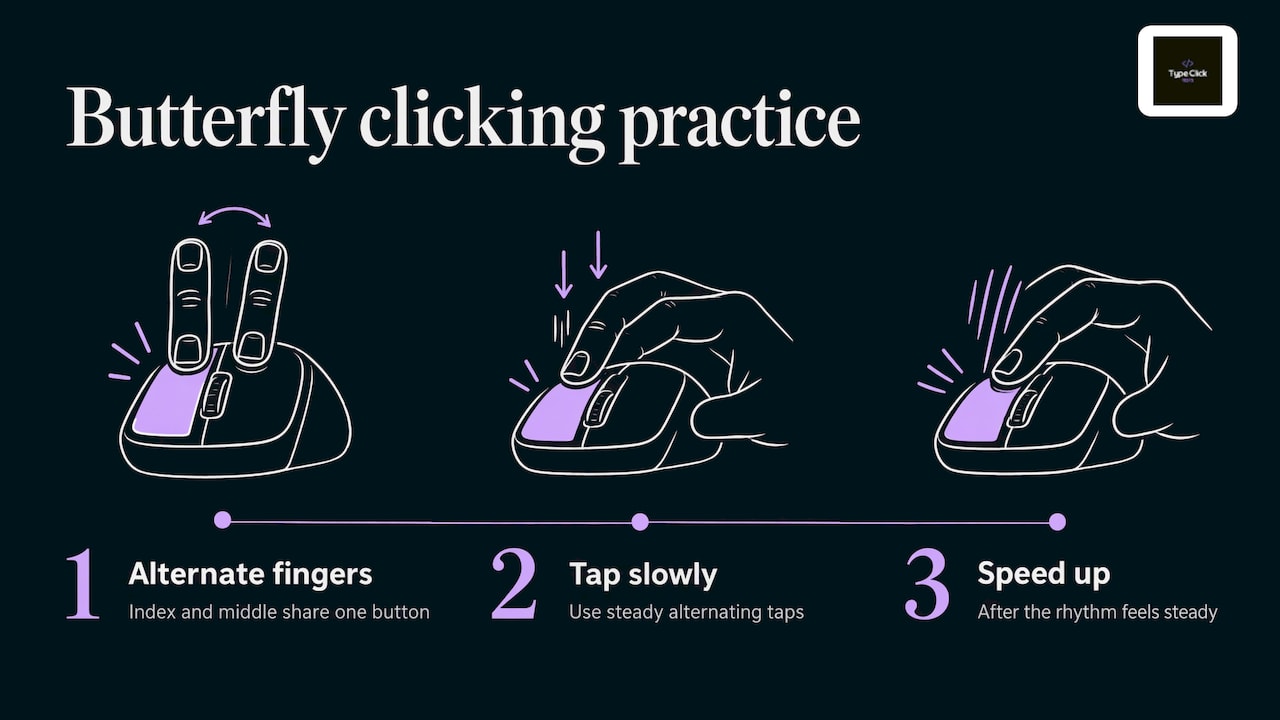
Butterfly clicking uses two fingers, usually index and middle, that alternate on a single button. Each finger only has to click half as often, which is why scores often climb. The difficulty is coordination: the two fingers must land evenly, or the rhythm stumbles and one finger does all the work. Practice it slowly first, as steady alternating taps, and only then speed up. It can take a few sessions before it feels natural.
A note on button design: some mice limit how quickly a press can register, and button travel and weight vary between models. If your score hits a hard ceiling on one mouse but not another, the hardware may be part of the reason.
Step 3: Build a practice routine that actually improves CPS
Random clicking until your hand is tired teaches you little. A short, structured routine does more.
A simple weekly plan
- Warm up (1 minute). Open and close your hand, shake out your wrist, then click at a relaxed pace for 20 to 30 seconds.
- Technique drills (3 to 5 minutes). Pick one style. Do short bursts of 2 to 3 seconds focusing only on evenness, not on the number.
- Scored attempts (3 to 5 minutes). Take three 5-second tests and write down the scores.
- Endurance check (once or twice a week). Take one 30-second test. If your CPS drops sharply from your 5-second number, your technique is relying on tension. Slow down and rebuild rhythm.
- Cool down. Stretch your fingers and wrists gently and rest your hand.
Total time is around 10 to 15 minutes. Three to five sessions a week is plenty. Short, frequent practice builds control better than one long, painful session.
Practice with the right focus
- Rhythm over speed. If your clicks are uneven, you are wasting energy. Aim for a steady, even tempo first and push the tempo up in small steps.
- Relax between attempts. Let your hand drop completely for 20 to 30 seconds between tests.
- Change one thing at a time. If you switch technique, mouse grip and mouse together, you cannot tell which change helped.
- Do not chase peak scores every time. Your average of five attempts is the number that shows real progress.
Step 4: Track your CPS so you know it is working
A single great score tells you almost nothing. Tracking is what separates real improvement from a lucky run.
What to log
Keep a small note on your phone or a spreadsheet with these columns: date, test length, technique, device, best score and average of your attempts. Same test length and same device every time.
How to read the numbers
- If your 5-second average rises over two to three weeks, your technique is improving.
- If your best score rises but your average does not, you are getting lucky bursts, not skill. Go back to rhythm drills.
- If your 30-second score is far below your 5-second score, your speed depends on tension. Work on relaxed repetition.
- If your score drops across a session, you are tired. Stop and come back tomorrow.
Expect gains to come in steps, with plateaus in between. That is normal for any motor skill. Our guide to improving CPS without hurting your hand goes deeper into pacing your progress.
Can you click 20 CPS, or 100 CPS?
These are the questions people ask most, and they get mixed up with mouse specs.
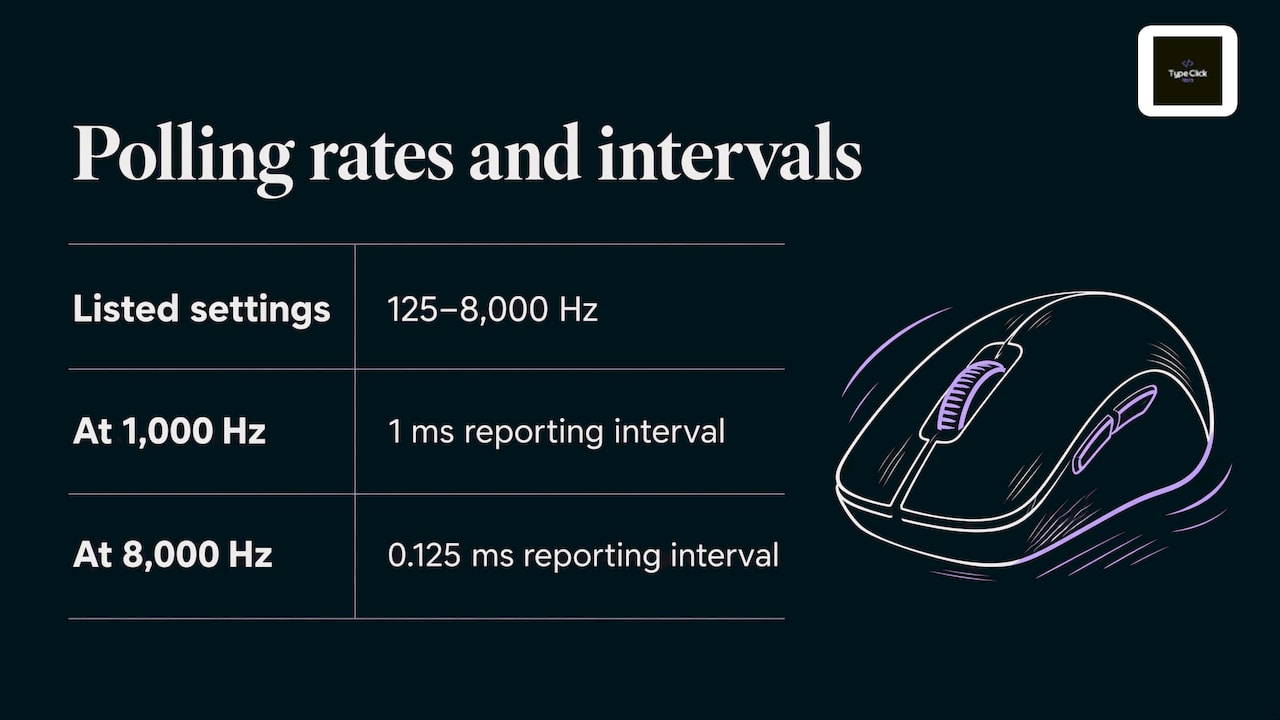
A mouse’s polling rate is how often it reports its state to your computer. Razer’s Viper 8KHz product page lists polling-rate settings from 125 to 8,000 Hz. That number describes how often data is reported, not how fast your finger can move. Digital Trends’ 2024 review explains that 8,000 Hz means a 0.125-millisecond reporting interval versus 1 millisecond at 1,000 Hz, and notes diminishing returns: a higher polling rate does not by itself make someone a better player.
The practical reading: hardware can stop holding you back, but it cannot click for you. Your technique, your rhythm and your hand’s comfort set the ceiling. Very high numbers you see in videos are usually short bursts with specialized techniques, not something you will hold across a test. Treat them as curiosities, not targets. A better goal is to beat your own 5-second average this month.
Protect your hand while you push speed
Fast clicking is repetitive motion, so build safety into the routine rather than adding it afterward.
- Stop at the first ache. Pain, numbness or tingling in your fingers, wrist or forearm means end the session. Do not push through it.
- Keep sessions short. OSHA notes that repetitive motions can lead to tendon and tendon sheath injuries, especially with the wrist bent. A straight wrist and frequent rests lower that risk.
- Keep the mouse close. Reaching for it loads your shoulder and neck as well as your hand.
- Alternate with something gentle. Gentle finger and wrist stretches between sessions keep your hand loose.
If pain lingers after you stop clicking for a few days, see a doctor or physical therapist before you resume. Do not try to train through it.
Where typing practice fits in
Clicking and typing both reward relaxed, even, repeated finger movement, and many people practice both. If you are a student or a professional who also needs to raise typing speed, the same principle applies: rhythm and accuracy first, speed second. Our guide on typing faster without losing accuracy covers that side.
Practice with the tests built for it
On Type Click Tests everything is free and runs in your browser with no account, so you can start a session in seconds. The clock is always visible and your CPS is calculated the moment a test ends, which makes the logging routine above simple. Start with the 5 Second Click Test for your daily scored attempts, then use the 30 Second Click Test for your weekly endurance check. You can see every click and typing test on our typing and clicking tests page.
When you want a break from clicking, the site also has browser games for reaction and memory, such as the Guess the Country map quiz.
FAQ
What is the fastest way to click faster?
Set up your arm and wrist properly, then practice one technique at a time, usually jitter or butterfly clicking. Track your 5-second average rather than your best run. Most improvement comes from rhythm and relaxation, not from clicking harder.
How do I get a higher CPS on a normal mouse?
You do not need a special mouse. Rest your forearm, keep your finger close to the button and keep a loose grip. Practice short bursts, then check your score on a timed test. A comfortable mouse that fits your hand helps you keep your technique through the whole test.
Is 100 CPS possible?
Mouse polling rates can reach 8,000 Hz, but that describes how often the mouse reports data, not how fast a person can click. Numbers that high are not a realistic target for a normal test. Focus on steady gains in your own average.
How often should I practice clicking?
Three to five short sessions a week of 10 to 15 minutes works well for most people. Stop at any sign of pain, numbness or tingling, and rest. If discomfort lasts for days, see a doctor before you continue.
Sources
- OSHA, Computer Workstations eTool: Additional Information
- Shacknews, Clicking fast with a mouse in 2022
- Razer, Viper 8KHz gaming mouse
- Digital Trends, Razer gaming mouse review (2024)